
Category: Tech

  • Custom PCB Design Solutions for Medical Devices

    Custom PCB Design Solutions for Medical Devices

    Printed Circuit Boards (PCBs) have become a critical component in the manufacturing of medical devices. Medical equipment manufacturers rely on PCBs to deliver the accuracy and precision required in healthcare devices. A custom PCB design can improve device performance, reduce size, and lower manufacturing costs.

    In this article, we will discuss custom Printed Circuit Board solutions for medical devices.

    Examples of Medical Devices that Use Custom PCBs

    Custom PCB designs are used in a wide range of medical devices. Here are a few examples:

    ECG Monitors:

    Printed circuit boards are used in ECG monitors to accurately capture the heart’s electrical signals. These PCBs must meet specific requirements, including low noise and high sensitivity.

    MRI Scanners:

    Custom PCB designs are used in MRI scanners to control the magnetic field and the radiofrequency signals. These PCBs must meet strict regulatory requirements and have high reliability.

    Custom PCB Design Solutions for Medical Devices1

    Implantable Medical Devices:

    Custom Printed circuit boards are used in implantable medical devices such as pacemakers, neurostimulators, and cochlear implants. These PCBs must meet specific requirements, including biocompatibility, low power consumption, and high reliability.

    Diagnostic Equipment:

    Custom Printed circuit boards are used in diagnostic equipment such as blood glucose monitors, blood pressure monitors, and pulse oximeters. These PCBs must meet specific requirements, including accuracy, precision, and low power consumption.

    In each of these medical devices, custom PCB designs play a critical role in delivering the accuracy, precision, and reliability required in healthcare. By working with a reliable PCB design service, medical device manufacturers can ensure that their devices meet regulatory requirements and deliver optimal performance.

    PCB Design Solutions for Medical Devices:

    PCB design solutions provide comprehensive, custom-tailored solutions. Designers use computer-aided design (CAD) software to create custom PCBs that are optimized for medical equipment. PCB design solutions can include:

    Multi-Layer PCBs:

    Medical devices often require multiple layers of circuitry to fit all the necessary components within a compact space. Multi-layer PCBs offer a cost-effective solution for complex circuitry by stacking several layers of circuitry on top of each other.

    Flex PCBs:

    Flex PCBs are an ideal solution for medical devices that require a high level of flexibility. These flexible circuits can bend and conform to complex shapes and are ideal for wearable devices and implantable medical devices.

    High-Density Interconnect (HDI) PCBs:

    HDI PCBs use advanced manufacturing techniques to create highly compact circuits that pack more components into a smaller space. These PCBs are ideal for medical devices that require high performance in a small form factor.

    Through-Hole and Surface Mount Technology (SMT) PCBs:

    Through-hole technology is a traditional method of creating circuits where components are inserted through drilled holes on the PCB. Surface mount technology (SMT) places components directly on the surface of the PCB. These two technologies can be used together to create complex circuits that offer a high level of functionality and reliability.

    Importance of Custom PCB Design in Medical Devices

    Custom Printed circuit board design is essential in the development of medical devices. Each medical device is unique, and the PCB must meet specific requirements such as accuracy, precision, and reliability. A custom PCB design ensures that the device performs optimally and meets the regulatory requirements.

    PCB Design Considerations for Medical Devices

    When designing PCBs for medical devices, several factors must be considered. These include the device’s size, power consumption, and the specific medical application. The Printed circuit board design must also meet regulatory requirements, including electromagnetic compatibility and safety regulations. PCB designers must work closely with medical device manufacturers to understand the device’s requirements and ensure that the Printed circuit board design meets those requirements.

    Choosing a PCB Design Company

    For getting Custom PCB Design Services, you need to find a PCB design company. There are several factors to consider. Here are a few things to keep in mind:

    Experience:

    Look for a company with experience designing custom Printed circuit boards for medical devices. They should have a deep understanding of the regulatory requirements and the unique challenges associated with medical device PCB design.

    Quality:

    Quality is critical when it comes to medical devices. Look for a company that has a proven track record of delivering high-quality PCB designs that meet the required specifications.

    Reliability:

    Medical devices are often critical, and reliability is essential. Look for a company that uses high-quality materials and has a robust quality control process in place to ensure that the PCBs are reliable.

    Communication:

    Communication is crucial when working with a PCB design company. Look for a company that communicates clearly and frequently, providing regular updates and working collaboratively with your team.

    By considering these factors when choosing a PCB design company for medical devices, you can ensure that your devices are accurate, reliable, and meet regulatory requirements.

    Arshon Technology is a PCB design firm with extensive experience in designing custom PCBs for medical devices. They specialize in meeting the unique challenges associated with medical device PCB design, including regulatory requirements and reliability. With a focus on quality and communication, Arshon Technology is dedicated to delivering high-quality PCB designs that meet the required specifications.

    If you are looking for a reliable PCB design service for your medical device, consider visiting Arshon Technology’s website at https://arshon.com/. Their team of experts can help you design a custom PCB that meets your device’s specific requirements and regulatory standards.

    Conclusion

    Custom PCB design solutions offer medical equipment manufacturers a range of options to optimize the performance and reduce the size of medical devices. PCB design services offer a range of options, including multi-layer, flex, HDI, and through-hole and SMT PCBs, to meet the unique requirements of medical devices. By working with a reliable company, medical equipment manufacturers can ensure that their devices are accurate, reliable, and cost-effective.

  • Rajkotupdates.news : Youtuber Carryminati Appointed as Winzo Brand Ambassador

    Rajkotupdates.news : Youtuber Carryminati Appointed as Winzo Brand Ambassador

    CarryMinati, also known as Ajey Nagar, is a popular YouTuber with over 30 million subscribers. He is known for his unique style of content creation and has a massive fan following. Recently, WinZO, an online gaming platform, announced CarryMinati as their brand ambassador. This move is expected to help WinZO increase its brand visibility and attract more users. In this article, we will discuss this development in detail.

    Who is CarryMinati?

    CarryMinati is a popular YouTuber from India, known for his gaming and commentary videos. He started his YouTube channel in 2014 and has since then gained a massive following. He has won several awards for his content and is one of the most influential creators in the Indian digital space.

    What is WinZO?

    WinZO is an online gaming platform that offers a variety of games, including fantasy sports, arcade games, and more. The platform has over 100 games, and users can win real money by playing these games. WinZO has been growing rapidly in India and has become one of the most popular online gaming platforms.

    CarryMinati as the brand ambassador for WinZO The announcement of CarryMinati as the brand ambassador for WinZO has created a lot of buzz in the gaming community. The move is expected to help WinZO increase its brand visibility and attract more users. Here are some of the key benefits of this partnership:

    1. Increased brand visibility: CarryMinati has a massive fan following, and his endorsement of WinZO is expected to increase the brand’s visibility among his followers.
    2. Targeting the youth: CarryMinati’s fan base consists mostly of young adults and teenagers. By appointing him as the brand ambassador, WinZO is targeting this demographic and hoping to attract more users.
    3. Trust factor: CarryMinati is a well-respected figure in the Indian digital space. His endorsement of WinZO is expected to increase the trust factor among potential users.
    4. Competitive advantage: The online gaming space in India is highly competitive, and WinZO is competing with several other platforms. By appointing CarryMinati as the brand ambassador, WinZO is gaining a competitive advantage.

    For more query about this type of similar topics, you can read this article : Rajkotupdates.news: PM Modi India Happy to Join Single Use Plastics

    Winzo Brand Ambassador

    One unique aspect of WinZO’s choice to appoint YouTuber CarryMinati as their brand ambassador is the potential reach it may have among India’s younger generation. CarryMinati, whose real name is Ajey Nagar, has over 30 million subscribers on YouTube and is extremely popular among young people in India. By partnering with CarryMinati, WinZO may be able to tap into a previously untapped market of younger gamers who are more likely to be drawn to the brand due to their ambassador’s endorsement. This type of influencer marketing has become increasingly popular in recent years, particularly in the gaming industry, as companies look for ways to reach new audiences and build brand loyalty among younger consumers.

    The appointment of CarryMinati as the brand ambassador for WinZO is expected to be a game-changer for the platform. CarryMinati’s massive fan following and influence in the Indian digital space are expected to help WinZO increase its brand visibility and attract more users. With the online gaming space in India becoming more competitive, this move is likely to give WinZO a competitive advantage over its rivals. We are excited to see how this partnership develops and how it affects the Indian online gaming industry.

  • Making the Switch to Fiber Internet: What You Need to Know

    Making the Switch to Fiber Internet: What You Need to Know

    If you are considering making the switch to fiber internet, you might be wondering what you need to know before making the move. Fiber internet offers a range of benefits over traditional copper-based internet, including faster speeds, better reliability, and lower latency. In this post, we’ll take a closer look at what fiber internet is, why you might want to switch, and what you need to consider before doing so.

    What is Fiber Internet?

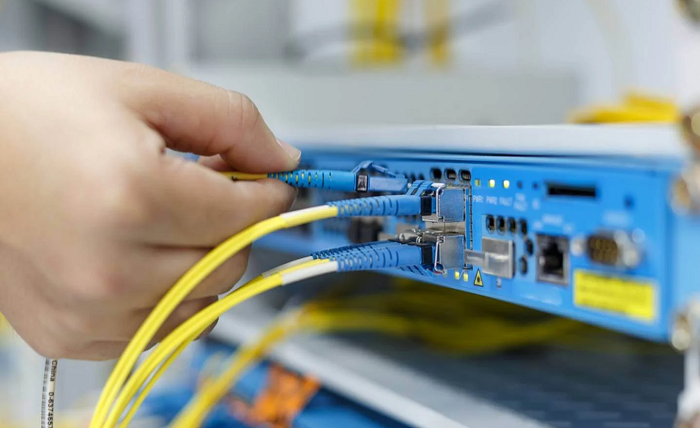
    Fiber internet is a type of broadband internet connection that transmits data through fiber-optic cables. Unlike traditional copper-based internet, which uses electrical signals to transmit data over copper wires, Chula Vista fiber internet uses light to transmit data over glass fibers. This allows for better reliability, faster speeds, and lower latency.

    Why Switch to Fiber Internet?

    There are several reasons why you might want to make the switch to fiber internet. First and foremost, fiber offers faster speeds compared to traditional copper-based internet. This is because fiber-optic cables can transmit data at much higher speeds compared to copper wires. With fiber internet, you can expect speeds up to 100 times faster in comparison.

    Along with the faster speeds, fiber internet is also more reliable. Fiber-optic cables are less susceptible to interference and more resistant to damage from environmental factors like moisture and weather conditions. As a result, fiber internet is less likely to experience downtime or service interruptions.

    Finally, with fiber internet, you also get lower latency, which refers to the time that it takes for data to travel from your device to the internet and back. Lower latency means faster response times and a better overall internet experience, particularly for video conferencing and online gaming.

    What Do You Need to Consider Before Switching?

    Before changing to fiber internet, there are a few things that you will need to consider. First of all, you will need to check if fiber internet is available in your area. While fiber is becoming more widely available across the country, it may not yet be available in all areas.

    You will also need to think about the cost of switching to fiber internet. While fiber can offer more reliability and faster speeds, it may also come at a higher cost compared to cable. You will need to weigh up the benefits of getting fiber against the cost to determine if it is worth it for you.

    Along with this, consider the installation process for fiber internet. Switching to fiber typically involves installing new equipment, including a fiber-optic modem and router. You will also need to have fiber-optic cables installed to your home or office. This installation process can take several hours to a few days depending on the complexity of your setup.

    Finally, consider the provider you choose. Not all fiber internet providers are created equal, so it’s important to do some research and choose a provider that is known for reliable services, competitive pricing, and good customer support.

    Switching to fiber internet can offer a range of benefits. However, before you make the move, it’s worth considering the above factors to ensure that it’s the right choice for you.

  • Tree Brushes Procreate for Download: The Ultimate Guide

    Tree Brushes Procreate for Download: The Ultimate Guide

    If you’re a digital artist, you’ve probably heard of Procreate – the popular digital drawing and painting app for iOS devices. Procreate has gained a massive following for its extensive features and ease of use, and its library of brushes is one of the app’s biggest selling points. In this article, we’ll be discussing tree brushes for Procreate – where to find them, how to download them, and how to use them to create stunning digital art.

    What are Tree Brushes?

    Before we dive into where to find tree brushes for Procreate, let’s first talk about what they are. Tree brushes are a specific type of digital brush that mimics the texture and appearance of trees – whether it’s the bark, leaves, or branches. These brushes can be used to add depth and realism to digital paintings, particularly those that feature natural landscapes or environments.

    Why Use Tree Brushes?

    Using tree brushes in your artwork can add a level of detail and realism that’s difficult to achieve with traditional digital brushes. Whether you’re creating a forest scene, a landscape with a lone tree, or simply adding texture to an image, tree brushes can help your work stand out from the crowd. Additionally, using brushes that are specifically designed for certain types of textures can save you time and effort compared to manually creating the same effect.

    Where to Find Tree Brushes for Procreate

    Now that we’ve covered what tree brushes are and why you might want to use them, let’s talk about where to find them for Procreate. There are several options available, including free and paid resources.

    1. Procreate’s Default Brushes

    First and foremost, it’s worth noting that Procreate comes with a variety of default brushes, some of which can be used to create tree-like textures. For example, the “Bark” brush in the “Sketching” brush set has a rough, textured appearance that could be used for tree trunks. Similarly, the “Foliage” brush in the “Painting” brush set has a natural, leaf-like appearance.

    1. Procreate Brush Libraries

    In addition to the default brushes, Procreate also has a library of brush sets that can be purchased from the app’s built-in store. Many of these sets include brushes that are specifically designed for creating tree textures, such as the “Tree Set” by Brushes for Procreate, which includes brushes for leaves, branches, and bark.

    1. Third-Party Websites

    Finally, there are several third-party websites that offer free and paid Procreate brushes, including those that are specifically designed for creating tree textures. Some popular options include Gumroad, Creative Market, and Envato Elements.

    How to Download and Install Tree Brushes for Procreate

    Once you’ve found the tree brushes you want to use, downloading and installing them is a straightforward process. Here’s a step-by-step guide:

    1. Download the brush file – whether it’s from Procreate’s built-in store or a third-party website – to your device.
    2. Tap and hold on the brush file until a menu appears.
    3. Select “Copy to Procreate.”
    4. Open Procreate and create a new canvas.
    5. Tap the “Brush” tool from the toolbar on the left-hand side.
    6. Tap the “+” button in the top right-hand corner.
    7. Select “Import” from the menu that appears.
    8. Find the brush file you copied to Procreate in step 3 and select it.
    9. The brush will now be added to your brush library and ready to use.

    Using Tree Brushes in Procreate

    Now that you’ve downloaded and installed your tree brushes, it’s time to start using them in your digital artwork. Here are some tips and techniques for using tree brushes in Procreate:

    1. Start with a Sketch

    Before you start using your tree brushes, it’s a good idea to sketch out your composition first. This will help you determine where you want to place your trees and what type of texture you want to create.

    1. Choose the Right Brush

    Depending on what type of tree texture you’re trying to create, you’ll want to choose a brush that matches the effect you’re going for. For example, if you’re painting a pine tree, you might want to use a brush that has a lot of thin, spiky bristles to create the appearance of needles.

    1. Experiment with Brush Settings

    Once you’ve selected your brush, it’s worth experimenting with the brush settings to achieve the desired effect. You can adjust the size, opacity, and flow of the brush to create a range of textures and depths.

    1. Build up Layers

    To create a realistic-looking tree, it’s often helpful to build up layers of texture gradually. Start with a base layer of rough bark or branches, then add finer details like leaves or needles on top.

    1. Use Reference Images

    If you’re not sure what a particular type of tree looks like, it can be helpful to look up reference images online. This will give you a better sense of the shape and texture of the tree, which you can then try to replicate in your artwork.

    Conclusion

    Tree brushes for Procreate are a fantastic resource for digital artists who want to add naturalistic textures to their work. Whether you’re a beginner or an experienced artist, there are plenty of options available for finding and using tree brushes in your compositions. By experimenting with different brushes, settings, and techniques, you can create stunning digital artwork that captures the beauty of the natural world.

  • 5 Postman Alternatives You Should Know About

    5 Postman Alternatives You Should Know About

    Postman Alternative is an excellent collaboration tool for API management. It provides a sleek user interface for making age back-end requests, removing the need to write a long queue of code to test API functionality. API is a clever intelligent tool that helps to establish a bridge between the consumer request and the backend and guarantees that the request is returned and fulfilled. For example, if you are ordering food and have entered your favourite food variety into your website and are seeking it in a more convenient place, API helps to convey your food preference to the backend for research and returns the desired list of restaurants in your area. You must test the API to ensure that the project satisfies the functionality, security, and performance goals.

    • Testsigma: Testsigma is one such application that has no framework, no setup, no coding, Opensource. Testsigma is a cloud-based end-to-end automatic API testing platform that allows anybody to automate API testing beginning with application design and eliminates the complexity of configuring environments and writing programs.
    • Paw: A Paw is an interactive tool that encourages collaboration. It allows you and your crew to make adjustments while also receiving real-time information. You may also use it to synchronize API test setups. This application facilitates the development and testing of software. The user interface is excellent. Our APIs will be easy to see and test for end users. More consistent and efficient than the competition.
    • Insomnia: Insomnia offers strong tools to assist your team in accelerating API development. The established specification editor can help you get the most out of API development. You may simply make adjustments without switching programs thanks to the rapid design preview. Cross-platform works in all types of systems like Linux, Mac, etc. Insomnia makes open-Source software available. It has an excellent user interface
    • Testfully: The Postman alternative is browser-based and requires no program installation. It endorses Environments and Configs, in addition to the capability to include random data in your queries, and can analyze replies from both locally and deployed restfully and GraphQL APIs. Support for Multiple Environments Testfully stores your requests to the cloud, allowing you to effortlessly share them with your co-workers. The API testing and monitoring features of testfully allow you to simply re-use tests and confirm the accuracy of your native and deployed APIs in diverse contexts. Utilize your current requests to implement multi-step tests.
    • Swagger User Interface: Another Postman option for easier API viewing and engagement with API resources is Swager UI. This Postman alternative features well-organized, easy-to-navigate documentation. To boost productivity, you can rapidly discover personnel and collaborate with them. Because the open-source program has no dependencies, it may be used in any setting, local or online. It is simple to use and enables end developers to engage with and explore API activities. API documentation could be improved. It establishes a foundation for organizing and categorizing techniques.

    Conclusion

    Although we have discussed a number of the top API Testing alternatives, which one is ideal for you depends on your needs and preferences. Each of these instruments has its expertise and people that may satisfy your needs in their way. Each of these options was created to save time and make testing president March month efficient and successful. They are also affordable and non-commercial installation news in maintenance, so meeting your demands and requirements is of the utmost significance.

  • Types of Practice Management Software

    Types of Practice Management Software

    There should be no room for errors in medical practice. It is all part of a life-saving system, from managing patient data to operating room procedures. Practice management software provides the ideal solution to minimize the risk of human error in this field. Here is what you should know about practice management software types, key features, and benefits:

    Practice Management Software

    Practice management software is a system that helps streamline medical and healthcare practice operations. The system can help schedule, invoice, and manage all patient information.

    Medical practice systems save staff time so they can focus on patient care. This also benefits patients who need treatment urgently. Modern management software improves communication between the doctor and the patient, enabling more effective treatment.

    Types of Software

    Medical practice software varies depending on the nature and extent of the services offered. The following are five types of software covering different facets of medical practice.

    1. Electronic Medical Records (EMR)

    An EMR works like a digital patient chart that documents the patient’s medical history. It contains previous diagnoses, treatments, and procedures. The medical expert who attended to the patient will also be noted for further consultation if needed.

    When a medic keys in the patient’s name, the medical database supplies all the pertinent information. This software saves the time needed to retrieve paper medical records, speeding up service delivery.

    2. Electronic Health Records (EHR)

    An electronic health record is like an EMR but more comprehensive. EHRs offer a patient’s complete medical history. These records have a standard format for exchange across various healthcare service providers.

    EHRs provide detailed records of a patient’s overall health, making it simple for authorized people to access the needed details.

    3. Telemedicine Software

    Telemedicine software helps to reduce the need for physical doctor visits. With the outbreak of the Covid-19 pandemic, it gained popularity as a way to reduce the doctor-patient communication gap. Patients can schedule consultations and get the diagnosis and sometimes treatment from their homes.

    Telemedicine software may combine video conferencing with e-prescription and billing features for more integrated systems.

    4. E-prescription Software

    E-prescription software is a part of remote healthcare solutions. This software allows doctors to write prescriptions for medications and dietary supplements online. Doctors can track, modify, or pause a patient’s medications.

    software is often connected with a national drug reference database to track intake and prevent drug addiction.

    5. Medical Billing Software

    Medical billing software is an automatic payment system. It facilitates payment by accepting various payment methods.  Patients get a detailed account breakdown directly from their devices, reducing queries about the payment. The medical facilities benefit from the error-free records of all invoices and payments.

    Software Features

    There are many medical management software brands, each with unique features. Choose software with the following fundamental features for maximum benefits:

    1. Data Management

    Data management establishes industry standards for storing, transferring, and accessing patient information. This feature prevents the misuse of data by carefully securing it. It also promotes seamless integration across facility departments by capturing demographic data based on health status, gender, or age.

    2. Scheduling

    Setting patient appointments and doctor schedules on paper can be time-consuming and prone to errors. An AI scheduling feature automatically manages programs and displays open slots for new appointments.

    3. Health Insurance Verification

    Medical staff should confirm a patient’s insurance coverage before offering any services. They must determine whether a patient qualifies for coverage for a specific ailment, medication, or procedure.

    This feature helps patients make payment arrangements to cover whatever the insurance does not.

    4. Billing

    Manual billing services are prone to human errors. A billing feature evaluates claims for problems and uses AI-powered programs. If the software detects any issues, it notifies the responsible department.

    5. Business Insight

    Medical practice software should give you insights into the capacity and profitability of your business. Using these insights, you can learn where to improve and how.

    Find Practice Management Software You Can Trust

    Medical practice management systems are changing as patient needs change in the digital age. Improving employee and customer experiences can help you deliver better healthcare services to your patients. To find the best practice management software, identify the type of system and specific features your company needs.

  • What is the online calculator calq.me for the site and where to get it

    What is the online calculator calq.me for the site and where to get it

    The online calculator is a software product of calq.me, which allows users to calculate the cost of a purchase or order of a service on the merchant’s website, taking into account various parameters and characteristics. Thus, the visitor can independently estimate the final cost of the product or service he is interested in without communicating with a manager and make a decision about the purchase.

    A huge number of business sites in various fields need calculators:

    • construction (to calculate materials or the cost of repair work);
    • Credit and investment (to calculate the amount of contributions, interest rates);
    • realtor sites (for choosing available housing and office options); why
    • cleaning (to calculate the cost of cleaning services);
    • sites of cafes and restaurants (for drawing up menus, ordering meals), etc.
    • To create a calculator, like any other program, you need to know programming languages. Therefore, previously such functionality had to be ordered from web studios or freelance programmers.

    Webmasters who independently develop sites on one of the CMS (content management system) can find and install the appropriate plugin on their resource.

    In recent years, services have started to appear, allowing you to create calculators of goods and services in a few clicks, without any special knowledge and skills. This can be done for free or with minimal investment.

    The advantages of creating an online calculator using online designers

    1. The benefit. Self-development and updating the form will save on expensive programming services.
    2. Quickness. Creating a calq.me calculator with the constructor will take a maximum of a few hours, even for novice Internet entrepreneurs.
    3. Convenience. With ready-made tools the user builds in the visual editor of Online Calculator completely adapted to their own needs.

    Functions of the buttons of the online calculator

    [ x ] – multiplication, [ ÷ ] – division, [ + ] – addition, [ – ] – subtraction;

    [ % ] – interest calculation;

    [ MU ] – work with markup;

    [ 00 ] – entering 2 zeros;

    [ 0 ], [ 1 ], … [ 9 ] – number keys;

    [ → ] – delete last digit;

    [ +/- ] – change mathematical sign of the number to the opposite one;

    [ √ ] – calculate the square root;

    [ M+ ] – store result in memory, with [ + ] sign;

    [ M- ] – store result in memory, with [ – ] sign;

    [ MR ] – display the memory on the display;

    [ MC ] – reset memory;

    [ AC ] – reset calculator and memory;

    [ C ] – reset the calculator, without clearing memory.

    Example of using the online calculator

    School problem

    The physics problem asks you to calculate the displacement of a body in equi-accelerated motion. This is a simple problem, all variables are given, which you need to substitute in the formula:

    S = S0 + Vo × t + (a × t2)/2

    Using an ordinary calculator, you would first need to calculate the value of (a × t2)/2, then Vo × t, and only then sum up all the terms of the expression. Using a one-line calculator, this is much easier to do. Let the initial coordinate S0 = 2, the initial velocity Vo = 20 m/s, the time of motion t = 10 s, and the acceleration of the body is a = 2 m/s2. Knowing the values of all parameters we can write these values in the line according to the formula and make calculations. Let us write it taking into account the calculator syntax, in which the multiplication sign is written as * (asterisk):

    S = 2 + 20 * 10 + (2 * 102) / 2 = 213

    The calculator instantly calculated the expression, and we calculated that the body traveled 213 meters.

  • Understanding the Cost of Electronic Design Services

    Understanding the Cost of Electronic Design Services

    Understanding the cost of outsourcing services is crucial for many businesses looking to reduce costs and increase efficiency.

    This article will focus on the cost of electronic design services, which is an essential step in the development process for many industries. We will discuss the various factors that can affect the cost of electronic design services, as well as the importance of finding a reliable and experienced electronics design company for your project. Additionally, we will analyze the cost benefits of outsourcing electronic design services and discuss the potential risks associated with it. Finally, we will provide tips to help businesses make informed decisions when comparing electronic design service providers.

    Analyzing the Cost Benefits of Outsourcing Electronic Design Services

    Outsourcing Electronic Design Services can be an effective way for a business to reduce costs and increase efficiency. By outsourcing these services, businesses can focus on core competencies, while reaping the cost benefits of not having to hire and train in-house specialists.

    However, in order to make an informed decision about whether or not to outsource electronic design services, businesses must consider all of the associated costs and benefits.

    1- Cost saving

    One of the major advantages of outsourcing electronic design services is the cost savings. By outsourcing, businesses can save money on costly in-house personnel and reduce overhead costs. Additionally, outsourcing can save money on equipment and other materials that are necessary for the design process. 

    2- expert knowledge and experience

    By outsourcing to a specialized third-party provider, businesses can be confident that their design projects are being handled by experienced professionals who have the necessary skills and resources to complete the task. This can help to ensure that projects are completed on time and to the highest standards. 

    Risks of Outsourcing Electronics Design Services

    On the other hand, businesses must consider the potential risks associated with outsourcing. Many providers may offer low rates, but may not have the necessary experience or resources to produce the desired results. Additionally, outsourcing can increase the risk of data security breaches, as well as the potential for delays and miscommunication. Businesses should also consider the potential legal and financial implications of outsourcing.

    Overall, businesses must carefully weigh the costs and benefits of outsourcing electronic design services before making a decision. By understanding the associated costs and potential risks, businesses can make an informed decision about whether or not to outsource. With careful consideration, businesses can reap the cost benefits of outsourcing while avoiding potential pitfalls.

    Calculating the Total Cost of Ownership for Electronic Design Services

    When it comes to electronics design services, it is important to understand the total cost of ownership (TCO). The TCO encompasses all costs associated with the acquisition, ownership, and disposal of the services. It considers the initial purchase price, installation and setup fees, ongoing maintenance and license fees, and any other indirect costs that may occur.

    By understanding the TCO of these services, businesses can make informed decisions about how best to allocate their resources. The initial purchase price of electronic design services usually includes hardware, software, and other related components.

    Installation and setup fees may be required to properly configure the system. Ongoing maintenance and license fees may be charged on a periodic basis, typically monthly or yearly. These fees can vary significantly depending on the complexity of the service, the size of the system, and the type of service being provided.

    In addition to the direct costs associated with electronic design services, there are also indirect costs that need to be considered. These may include employee training, additional staffing, and infrastructure upgrades. Depending on the complexity of the system and the number of users, these costs can add up quickly. It is important to consider all potential costs when calculating the TCO of electronic design services.

    Overall, the TCO of electronic design services can vary significantly depending on the complexity of the system and the number of users. ‘

    By understanding all of the associated costs, businesses can make informed decisions about how to allocate their resources. By taking the time to calculate the TCO, businesses can ensure they are getting the best return on their investment.

    tLT4BQv9nuAD6 SOZGY4t wYjtARpzFXqQ95tqfkt706e2 O6x9yuyKBx7tPNGSwjJI8ExAG7yr7 b1TCtnDYSLngeTB hCWdUOprwQZ4hnRFHOMUvD6zKhAd5oiuI0asqEnFdVryCc 8 9wQUZc0uIzn4wJifSi

    What to Look for When Choosing an Electronic Design Company

    When comparing electronic design companies, there are several factors to consider.

    1. It is important to ensure that the provider has experience working with the type of project you have in mind.
    2. They should also be able to provide references and a portfolio of past work to demonstrate their capabilities.
    3. Additionally, it is important to consider the provider’s level of expertise, as well as their ability to communicate effectively and meet deadlines.
    4. Finally, the cost of the service should be evaluated in light of the provider’s experience, expertise, and track record. By carefully evaluating these factors, businesses can choose the right electronic design service provider for their project and ensure that they receive high-quality service at a fair price.

    Arshon Technology is an experienced electronic design company that specializes in providing custom electronics design services to a wide range of industries. With a team of skilled engineers and designers, Arshon Technology is able to offer end-to-end electronic design solutions, from concept to production. 

    The company has a proven track record of delivering high-quality products that meet the specific needs of their clients, while also offering competitive pricing and exceptional customer service. If you are looking for a reliable and experienced electronics design company, Arshon Technology is a great choice.

    Conclusion

    In conclusion, understanding the cost of electronic design services is a complex process that requires a thorough understanding of the market. By researching the available services, understanding the cost structures, and working with reliable and experienced service providers, it is possible to ensure that the right service is chosen at the right price. Ultimately, understanding the cost of electronic design services can help organizations save money, while still ensuring that they receive the highest quality of service.

  • EDC Essential: The 5000mAh Compact Powerbank That Fits in Your Pocket

    EDC Essential: The 5000mAh Compact Powerbank That Fits in Your Pocket

    As technology continues to advance, our dependence on electronic devices has also increased. Whether it be our smartphones, laptops, tablets, or portable gaming devices, we rely on these devices to stay connected, productive and entertained. However, with the increased usage comes the need for a reliable and portable power source. This is where compact powerbanks come in. They are an essential everyday carry (EDC) item that can provide us with the power we need when we need it. The 5000mAh compact powerbank is a top choice for its small size and powerful charging capabilities. One such product that stands out in this category is the Pixy Mini Powerbank.

    The Importance of EDC Powerbanks

    In today’s fast-paced world, having a portable power source with you at all times is crucial. A compact powerbank can help to extend the battery life of your devices and allow you to charge multiple devices at the same time. The convenience and peace of mind that comes with having a compact power bank as an EDC essential cannot be overstated. Imagine being stranded without a phone or being unable to complete an important task on your laptop due to a dead battery. A tiny powerbank can help prevent these scenarios.

    The Pixy Mini 5000mAh Compact Powerbank: The Perfect EDC Powerbank

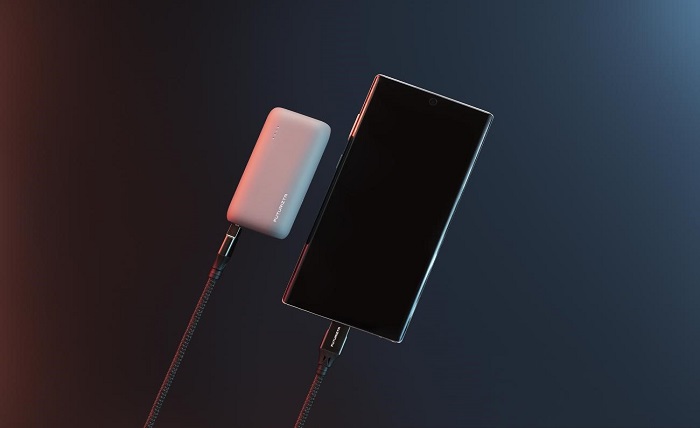
    The Pixy Mini Powerbank is a powerful and efficient option for on-the-go charging. Its advanced technology, high-quality materials, and powerful features make it one of the most powerful and efficient compact powerbanks on the market. This, edc powerbank features a 20W Power Delivery output, 5000mAh capacity, 18W PD input, dual output, and LED indicator. These features contribute to the Pixy Mini Powerbank’s ability to deliver maximum power in a small design. It stands out in terms of portability and power delivery compared to other compact powerbank on the market.

    How to Use the 5000mAh Compact Powerbanks an EDC Essential

    Using the Pixy Mini as an edc powerbank is easy. Keep it charged and easily accessible, such as in your pocket, purse, or bag. The compact design of the Pixy Mini Powerbank makes it easy to carry around, and its compatibility with various devices makes it a versatile solution for all your charging needs. Whether you are traveling, going on an outdoor adventure, or in an emergency situation, the Pixy Mini Powerbank will be there to provide you with the power you need.

    Conclusion

    In conclusion, the importance of having a edc powerbank cannot be overstated. The Pixy Mini Powerbank is the perfect solution for both personal and professional use. Its small size, powerful charging capabilities, and advanced technology make it a top choice for anyone who needs a reliable and portable power source. Don’t hesitate, to invest in the Pixy Mini Powerbank today and enjoy the convenience and power it offers. Remember, always be prepared and never be caught with a dead battery again.

  • The new.globe.com.ph SIM Registration form – how to access and register your SIM

    The new.globe.com.ph SIM Registration form – how to access and register your SIM

    Now in Philippines, all active SIM cards are required to re-register their SIM which is In compliance with Republic Act No. 11934 to keep scam activities eliminated. This whole process has caused many customers in search of how to go about the process, looking for registration forms and all that.

    Be glad you have the required information here. This article explains how to access the Globe Telecom SIM Registration form and register it.

    The new.globe .com .ph SIM Registration

    The new.globe.com.ph sim registration form is the new online web page portal for customers of Globe Telecom, one of the largest telecommunications companies in the Philippines to register their SIM. The form can be accessed through the Globe website, and is used to register a SIM card for a mobile phone which is now mandatory even if you have registered before.

    New.globe.com.ph SIM Registration Form

    The SIM registration form is a requirement for all new Globe customers, as it helps to prevent fraud and ensures that the customer is properly identified. It also allows Globe to verify the customer’s identity, which is necessary for activating the SIM card and connecting the customer to the network.

    The process of filling out the registration form is straightforward and easy to follow. You will need to have a good Internet connection and enough volume of data plan to begin the process

    To access the form and register your SIM you need to follow

    these steps

    1. Verify Your Identity
      The new.globe .com .ph SIM Registration1

    This is the first step taken to register your SIM as mandated. To do this go to the New Globe SIM Registration portal new.globe.com.ph if you are a prepaid customer and provide your phone number. An OTP will be sent to the number you provided. Enter the password to verify your identity.

    1. Fill out The Registration Form.
      The new.globe .com .ph SIM Registration2

    Here you will then be prompted to enter personal information, such as full name, date of birth, and address. You will also be required to provide a valid government-issued ID, such as Voter’s ID, National ID,  passport, or driver’s license, for verification purposes. You also be required to upload a selfie photo.

    The new.globe .com .ph SIM Registration3

    Once all of the required information has been entered, you will then be asked to submit the form and wait for the registration to be processed. It typically takes a few minutes for the registration to be completed, A unique reference number will be generated which you need to copy and keep safe.

    Globe Telecom takes customer security and privacy seriously, and the information provided in the registration form is kept confidential and protected. The information is used only for the purpose of activating the SIM card and providing the customer with a better mobile experience. Globe uses the collected data to verify the identity of the subscriber to prevent prepaid SIM card fraud and ensure the security of their network.

    In addition to the SIM registration form, Globe also offers a variety of other online services for its customers. These include the ability to view and pay bills, check account balances and usage, and manage their subscriptions. Customers can also access support, troubleshoot issues, and avail of the different promos and packages offered by Globe.

    conclusion

    The new.globe.com.ph sim registration form is an easy-to-use and efficient way for new Globe customers to register their SIM cards and start enjoying the services offered by the company. The registration process is quick and secure, and the form itself is straightforward and easy to understand. It is a mandatory process for all new Globe customers, and is an important step in preventing fraud and ensuring the security of the network.